 English
 Español
 عربي
عربي  Pусский
 Jun 11, 2026
Visit:487
Jun 11, 2026
Visit:487
If you’ve ever seen those frustrating light “ghosts” on your CI flexo press—a faint shadow behind a solid area, or repeating patterns that show up like clockwork—you know how maddening it can be. Ghosting doesn’t just ruin print uniformity; it also creates needless tension between you and your customer. The good news is that most ghosting issues can be solved with a systematic approach. The key is to first figure out which type of ghosting you’re dealing with.
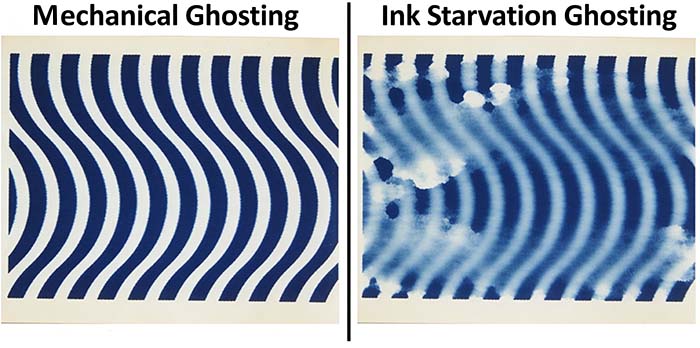
Stop the press and take the defective print under a standard light source. The shape of the ghost will tell you whether the problem is mechanical or related to ink starvation.
Mechanical ghosting looks very regular: the ghost repeats at a fixed interval, and that interval matches the circumference of a roller—either the central impression cylinder or the plate cylinder. You’ll see rows of repeating light marks across the web, as precise as a clock. This usually means there’s debris on the roller surface, worn bearings, or gear mesh problems.
Starvation ghosting looks completely different. It often appears right after a large solid area, in the following blank space, shaped like a fading tail or an uneven light patch. Imagine a big solid patch of ink, and right after it the area that should be clean shows a faint “shadow” that’s much lighter than the rest. That’s classic starvation ghosting, and it means the ink isn’t reaching the plate quickly or evenly enough.
Once you can tell these two apart, you’ve already taken the most important step. Now let’s fix them.
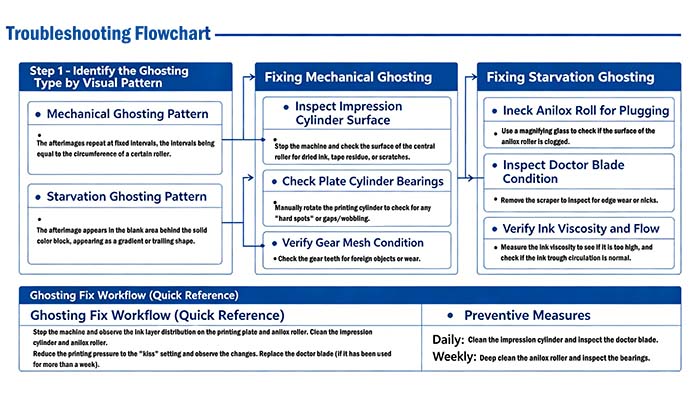
Mechanical ghosting usually comes from rotating parts. I suggest starting where most people overlook: the surface of the central impression cylinder. Stop the press, grab a flashlight, and slowly rotate the cylinder. Look for dried ink, leftover tape residue, or even tiny scratches. Impression cylinder contamination is a common hidden cause—Every time the cylinder turns, those imperfections stamp onto the plate—and ghosting appears. Cleaning the cylinder surface often solves the problem instantly. Just use the right cleaner and a soft cloth, and never scratch the surface.
If the cylinder is clean, move to the plate cylinder bearings. Turn the cylinder by hand and feel for smooth rotation. Is there a “hard spot” where it suddenly gets tight? Or does the cylinder wobble radially? Worn bearings cause tiny eccentric movements every revolution, and that repeating error shows up as ghosting. Trust your feel—or better, use a dial indicator.
On geared presses, don’t forget gear mesh condition. Open the guard and look at the gear teeth. Are there dried ink flakes or tiny debris stuck in the teeth? Those cause an impact every rotation, and the print shows mechanical ghosting. Clean the teeth and relubricate—it usually does the trick.
Starvation ghosting is more like a chronic condition in flexo, and it’s often tied to your daily maintenance habits. The first suspect is the anilox roll. Take a magnifying glass (50x to 100x) and look at the anilox surface. Are those tiny cells clogged with dried ink? A plugged anilox roll can’t transfer ink evenly, so the area after a solid simply starves. If you see plugging, stop and deep clean the roll. But here’s a tip: don’t just scrub with a brush. Soak the surface with a specialized cleaning chemistry, then use ultrasound or high-pressure wash—that works far better than brute force.
The second suspect is the doctor blade. Remove the blade and hold it up to light. If you see visible wear notches, a wavy edge, or if the blade has been running for more than a week, replace it immediately. A worn blade leaves fine streaks—what we call doctor blade marks—which are a form of starvation ghosting. While you’re at it, check the backup blade and the blade holder to ensure they’re straight and tight.
Finally, don’t overlook ink viscosity. Measure it with a viscosity cup. If the reading is much higher than the recommended range, your ink is too thick to flow properly. High-viscosity ink moves slowly in the chamber, so the anilox roll doesn’t fill up before the doctor blade wipes it. The result is starvation. Reduce the viscosity, and also check the pump and return lines in your ink circulation system. Dead spots in the pan let pigment settle, and ghosting gets worse.
When ghosting is driving you crazy, follow this order. Don’t skip steps. First, stop the press, remove the plate, and look at the ink distribution on both the plate and the anilox roll—any local starvation? Second, thoroughly clean the impression cylinder and anilox roll. No shortcuts with a dry rag. Third, reduce printing pressure to just-kiss contact and run a short sample. If ghosting gets lighter, your pressure was too high. Fourth, if your doctor blade has been running for more than a week, change it. Fifth, adjust ink viscosity back to the spec sheet range. These five steps eliminate more than 80% of starvation ghosting.
Ghosting doesn’t appear overnight. Every day, take five minutes to clean the impression cylinder surface and quickly check the doctor blade for wear. Every week, schedule a deep clean: use ultrasound or specialized brushes on the anilox roll, and check all roller bearings for play. These habits will keep most ghosting troubles away.
Q: Can plate mounting tape cause ghosting?
Yes. Uneven tape thickness or trapped air bubbles cause local pressure variations that look like mechanical ghosting. Remount the plate carefully.
Q: Why does ghosting appear only on one specific color?
That’s good news—it means the problem is isolated to that unit. Check its anilox roll, doctor blade, ink circulation, and the impression cylinder surface in that unit only. Don’t waste time on other stations.
Q: Does ghosting worsen at higher press speeds?
Yes, especially starvation ghosting. Higher speed means less time for ink to refill the anilox cells. If ghosting gets lighter when you slow down, your ink supply system can’t keep up with the speed.
By following these steps—from identifying the ghost type to cleaning rollers, checking bearings, deep-cleaning the anilox, changing the doctor blade, and adjusting viscosity—you can solve the vast majority of ghosting problems. But if you’ve tried everything and the ghosting is still there, you’re no longer dealing with routine maintenance issues. There may be mechanical damage to the impression cylinder surface (like worn chrome), severely worn bearings, or internal gearbox problems. Don’t keep running the press and wasting material.
Ready to finally eliminate ghosting on your CI flexo press:If the steps above don’t fully resolve the issue, our team is here to help. Contact us today for on-site diagnostics and a custom fix plan – no more guesswork, just clean, consistent print.
Oct 22, 2026
Sep 22, 2026
FLEXO PRINTING MACHINE
FLEXO PRINTING MACHINE
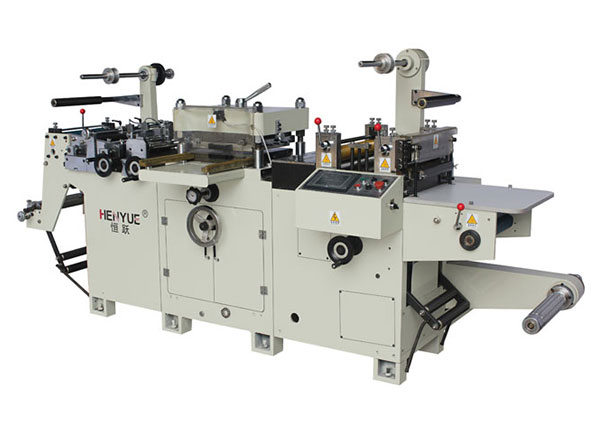
FLEXO PRINTING MACHINE
GET A QUOTE