
 English
 Español
 عربي
 Pусский
 Nov 05, 2026
Visit:11
Nov 05, 2026
Visit:11
A streak running in the print direction is one of the most common complaints on a chambered doctor blade system—and one of the most frequently misdiagnosed. The instinct on press is often to add blade pressure or blame the end seals. In practice, the shape of the streak itself carries diagnostic information that can narrow the search before a single part is removed. A closed chamber system is a metering instrument, and every streak is a signal about which part of that instrument has drifted out of tolerance. If you are also weighing whether a closed chamber design is the right foundation for your press in the first place, a side-by-side look at chamber doctor blade versus two-roll inking in flexographic printing is a useful starting point before chasing defects inside the chamber itself.
Streaks that run in the machine direction are not all the same defect. The pattern they form on the web or substrate points toward different failure modes inside the chamber.
A single, sharply defined dark line usually means a localized gap in the metering edge. A nick, chip, or a particle lodged under the blade tip lets a thin ribbon of excess ink pass through at one fixed cross-machine position. If the line stays in the same location regardless of blade oscillation, the blade edge itself is the first place to inspect.
A series of parallel lines, or a streak pattern that shifts or broadens near the chamber ends, points away from the blade tip and toward the sealing and pressure boundary. Worn or hardened end seals allow the pressure inside the chamber to work against the blade edge unevenly, and the resulting streaks often cluster toward one or both ends of the chamber rather than sitting in the middle of the web.
Intermittent streaks that come and go—appearing for a few revolutions, fading, then returning—are the signature of a fluctuating pressure input. The blade is not necessarily damaged; the force pressing it against the anilox is changing cycle to cycle, so the ink film thickness rises and falls with it.
The blade edge is the metering orifice of the entire system. A blade that looks intact can still meter poorly: a rounded wear land, a microscopic chip, or a line of dried ink trapped under the tip all create localized paths for excess ink.
The most common sequence is a small particle—a dried ink flake, a paper dust agglomerate, or a fragment of blade material shed from a previous run—passing between the blade and the anilox. That particle lifts the edge momentarily or embeds in it, and the result is a nick that passes ink for the remainder of the run. Once a nick is present, the streak is fixed in the cross-machine direction and does not disappear with oscillation.
Blade angle is inseparable from blade condition. A blade that is set too steep or too shallow wears unevenly even before it chips, and a contact angle that drifts under pressure changes the metering footprint in ways that look identical to edge damage. Before replacing a blade, confirm that the doctor blade angle for your flexographic press is within the intended contact range and that the holder is not deflecting under load. A nicked edge on a correctly angled blade points to debris or material selection; a worn edge on a misaligned blade points to setup.
After installation, confirm that the blade seats flat in the clamp and that loading is even across the full width. A distorted holder bar will produce a streak even with a brand-new blade. For presses where blade access and changeover speed are part of the production constraint, the top-loading design of the HRYC series flexo printing machine reduces the time between blade inspection and a clean wipe, which in practice means operators catch edge damage earlier instead of running through it.
End seals are often the first component blamed when ink appears near the chamber ends, but the seal itself is frequently a victim rather than the origin. A worn, hardened, or incorrectly sized end seal cannot maintain a stable pressure boundary at the chamber ends. Pressure fluctuations then work against the blade edge instead of being contained within the chamber, and the metering behavior at the ends of the anilox becomes inconsistent.
The diagnostic clue is streak location. A single blade nick produces a line in the middle of the print. End-seal-related streaking tends to appear toward the edges of the web or as a group of lines that change character when chamber pressure is adjusted. Before replacing seals, check that the seal radius matches the anilox radius, that the chamber is parallel to the roll, and that the seals are not saturated or hardened from ink exposure.
Chamber pressure is the variable most often “corrected” in the wrong direction. When a streak appears, adding pressure can temporarily smear the defect out of visibility, but it also deflects the blade, changes the effective contact angle, and accelerates wear. The streak returns, and the blade and anilox have both been damaged in the meantime.
The more fundamental cause of intermittent or cyclic streaking is pressure pulsation from the ink supply. Diaphragm pumps deliver ink in pressure waves rather than a continuous stream; even double-diaphragm designs reduce but do not eliminate the pulsation. When those pressure spikes reach the chamber, the force between the blade and the anilox fluctuates with them, producing an uneven ink film and density variation that appears as intermittent longitudinal streaking.
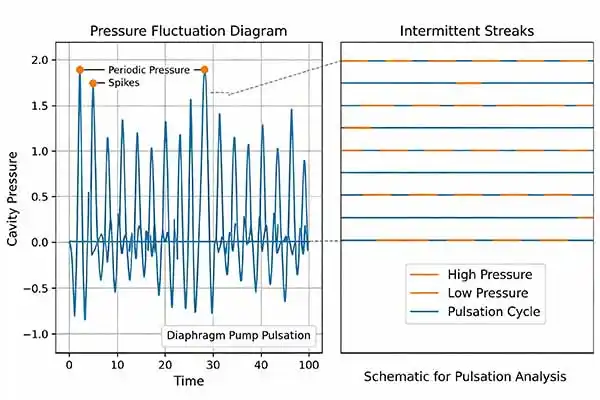
The chamber itself can also be the source of instability. A chamber that is difficult to purge, has dead zones at the ends, or relies on a pump curve that does not match the ink viscosity will never hold a steady metering pressure, no matter how carefully the blade is set. Flexo presses built around stable ink circulation and precise pressure adjustment in the HJA/HJ series are designed to keep chamber pressure within a narrow band during speed changes and order changes, which removes one of the most persistent hidden causes of intermittent streaking.
A particle trapped under the blade is the most direct route to a single-line streak, and it is also the most preventable. Dried ink skins, paper dust, and metallic fragments from blade wear all circulate in the ink system and eventually reach the metering nip. Once a particle lodges under the blade, it lifts the edge locally and creates the same gap as a mechanical nick.
The immediate response is to stop, clean the blade edge, and inspect for an embedded particle before assuming the blade is permanently damaged. But the longer-term fix is filtration and contamination control at the ink management level. An ink filter on the supply side, a strong neodymium magnet in the ink circuit to capture ferrous blade wear particles, and a disciplined chamber cleaning routine between jobs remove the debris before it reaches the blade tip.
Streak prevention on a chamber blade system comes down to controlling the three inputs that determine metering stability: the blade edge, the chamber pressure boundary, and the ink quality reaching the nip.
Filter the ink supply and install a magnet in the ink management circuit. This is the single highest-return preventive measure because it interrupts the debris-to-nick pathway at the source. A filter that is checked and changed on a defined interval is more reliable than a filter that is changed only when a streak appears.
Replace doctor blades on a defined cycle rather than waiting for visible failure. A blade that has lost its edge profile can still look intact while metering poorly. Many shops change the blade whenever the anilox roll is changed, or at a fixed interval tied to ink abrasiveness and blade material. For abrasive inks—whites, metallics, and certain coatings—the replacement interval should be shorter, and the blade specification should be matched to the wear mechanism rather than chosen on price alone.
Inspect end seals at every blade change. Look for hardening, saturation, and correct radius contact. Confirm chamber parallelism and blade angle at the same time. An angle outside the intended contact window changes the blade’s footprint and makes it more sensitive to pressure fluctuation and debris. When blade changeover and angle verification are built into a press platform rather than treated as a rebuild task, the tool-free changeover and precise registration of the HRYC flexo press shorten the window in which a marginal blade can keep running.
Run the lowest chamber pressure that produces a clean wipe. Higher pressure feels safer but deflects the blade and accelerates wear on the blade and anilox. Standardizing the setup procedure across shifts prevents one operator’s “correction” from becoming the next operator’s root cause.
Yes, and start-up streaks usually point to a condition that stabilizes once the system reaches operating temperature and flow. Cold, high-viscosity ink can momentarily overload the blade, and a pump or chamber that has drained overnight may deliver an irregular first flow before the pulsation dampener and return loop settle. If the streak disappears after a short run-in, the cause is more likely a start-up flow or viscosity condition than a permanent blade defect. If it persists after the press is at speed, treat it as a blade, seal, or debris issue.
The contact angle determines the size and shape of the blade’s footprint against the anilox. Too low an angle increases contact area and requires more pressure to wipe cleanly, which accelerates wear and can cause hydraulic lift. Too high an angle concentrates pressure on a narrow edge and makes the blade prone to chattering. The commonly cited target for flexographic reverse-angle doctoring is approximately 28°–32° contact; deviations make the blade more sensitive to every other variable in the system.
UV inks are substantially more viscous than water-based inks and many are thixotropic, meaning their viscosity drops under shear at the blade tip and recovers once the ink passes the edge. That behavior places a higher hydraulic load on the blade and makes an unstable, deflected, or worn edge more likely to let ink pass in an uncontrolled manner. The result can appear as streaking or ink spitting. The blade specification, thickness, and edge profile need to be selected for the higher-viscosity condition rather than carried over from a water-based setup.
If the same streak pattern keeps returning after blade, seal, and pressure checks have been exhausted, the constraint is often the press platform itself rather than a single consumable. The fastest way to narrow that down is to describe the streak pattern, ink system, and press model to someone who builds chamber systems every day—the technical team at Greenprint Machinery can map the symptom to the specific metering or circulation design on your machine and recommend whether the fix is setup, consumable specification, or a platform upgrade.

Oct 30, 2026
FLEXO PRINTING MACHINE
FLEXO PRINTING MACHINE
FLEXO PRINTING MACHINE
GET A QUOTE