
 English
 Español
 عربي
عربي  Pусский
 Oct 27, 2026
Visit:2
Oct 27, 2026
Visit:2
Sleeve technology is only as fast as the mounting step allows. A sleeve that slides on in seconds but sits 0.5 mm off its reference position will cost far more time in registration corrections and waste than it saved at changeover. For paper-based flexo work, where repeat length accuracy and color-to-color registration are unforgiving, the sleeve mounting procedure for quick change is a precision task disguised as a simple slide-on operation. The following checklist is built around what the operator actually does—before, during, and after the sleeve goes onto the mandrel.
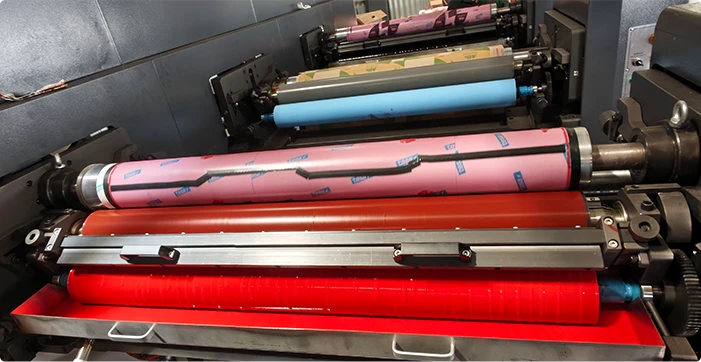
Two surfaces determine whether a sleeve mounts cleanly: the mandrel outside diameter and the sleeve bore.
Clean the air mandrel completely. Wipe the mandrel with a solvent-dampened rag to remove dried ink, tape residue, and dust. Run a finger along the surface to feel for burrs or nicks; even a small raised spot will cause the sleeve to drag instead of float. Pay particular attention to the air holes—clogged air holes are the leading cause of sleeve/mandrel seizures, because the air cushion cannot form evenly across the sleeve length.
Inspect the sleeve bore. Look for scratches, dried ink, or foreign material on the inside surface. Contamination on the bore impedes the air cushion and forces the operator to push harder, which increases the risk of cocking the sleeve on the mandrel. Do not use metal tools to chip away debris; dissolve and wipe it instead.
Verify air supply. Check that the gauge reads within the mandrel or sleeve manufacturer's specification and that hoses are free of kinks or leaks. For cylindrical air mandrels, typical mounting pressure is in the range of 6–8 bar, though always defer to the OEM specification for the specific press and sleeve system.
The following steps describe a cylindrical air-mandrel system, the dominant configuration on paper flexo presses.
1. Start the sleeve onto the mandrel by hand. Align the sleeve bore with the mandrel lead-in and push it on approximately one-third of its length. Do not force it. If the sleeve will not start straight, stop and recheck cleanliness and bore condition.
2. Apply compressed air. Open the air valve. Air escapes through the fine holes on the mandrel surface and forms a thin cushion between the mandrel and the sleeve bore. The sleeve expands slightly and begins to float. The correct pressure is the minimum that allows the sleeve to slide freely without dragging—excess pressure can disturb plate mounting tape adhesion if plates are already on the sleeve, and is unnecessary for bare sleeve installation.
3. Slide the sleeve to its reference position. With the air cushion active, push the sleeve smoothly along the mandrel until it reaches the axial position indicated by the mandrel scale, a positioning ring, or the press's locating pin. Do not slam the sleeve into the backstop; impact against the mandrel shoulder can chip sleeve ends and damage the bore.
4. Shut off the air. Once the sleeve is in position, close the air valve. The air cushion collapses, and the sleeve contracts firmly onto the mandrel. The interference fit—typically the sleeve bore is slightly smaller than the mandrel OD—locks the sleeve in place.
5. Verify concentricity by hand. Rotate the sleeve slowly and feel for any wobble or tight spot. A properly seated sleeve turns smoothly with no axial drift. If runout is suspected, confirm with a dial indicator or the press's TIR measurement function before proceeding to plate mounting.
Axial position consistency across color stations is what separates a fast changeover from a registration fight. Use a positioning ring or the mandrel's engraved scale to set each sleeve to the same reference datum. Where available, laser pointers or projection lines on the mounting table provide a visual target for axial alignment.
For multi-color jobs, mount the first sleeve, establish its reference mark, and use that mark as the zero point for all subsequent stations. This prevents cumulative axial error from station to station. A visual mark on the sleeve edge—such as a registration stripe—can be set to zero on the press's register control to maintain consistency across the run.
Fix: Use the mandrel's limit stop or positioning ring as a physical confirmation that the sleeve has reached its datum.
Fix: Use only enough pressure to float the sleeve, then stop.
Fix: Make cleaning a mandatory pre-mounting step, not an occasional one.
Dismounting follows the mounting logic in reverse. Open the air valve and allow the sleeve to float, then slide it off smoothly and steadily. Do not rock the sleeve up and down or back and forth during removal; rocking stresses the sleeve wall and can damage the bore or the mandrel surface. Once the sleeve is clear, close the air and place the sleeve vertically on a dedicated storage rack. Horizontal storage or stacking weight on sleeves can induce ovality and concentricity errors over time.
Air holes are the most maintenance-sensitive feature of the entire system. Inspect them at every sleeve change and clear any blockage before it causes a seizure. Replace damaged O-rings and check the air system—gauges, hoses, and fittings—for leaks or pressure drop.
Sleeve condition should be checked for wall thickness uniformity and concentricity on a scheduled basis. A sleeve that shows uneven wear patterns or a TIR outside the press's acceptable tolerance should be removed from production rotation before it causes registration inconsistency or plate lifting. Store sleeves vertically, in a clean and dry environment, and avoid stacking anything on top of them.
For cylindrical air mandrels, most sleeve and mandrel systems operate in the 6–8 bar range for mounting and dismounting, but the correct value is always the one specified by the mandrel or sleeve OEM. Use the minimum pressure that lets the sleeve float freely. Conical systems may require higher pressures, so never assume a universal setting.
Functionally, a cylindrical sleeve can be started from either end, but orientation matters for repeatability. If the sleeve carries a registration mark, axial positioning feature, or a preferred operator-side end, mount it in the same orientation every time. Consistent orientation eliminates one variable from registration setup and makes the sleeve's wear pattern predictable.
The reliable indicators are concentricity drift, uneven surface wear, and difficulty achieving repeatable registration that traces back to the sleeve rather than the plate or tape. Measure TIR regularly and compare against the press or sleeve supplier's tolerance. If a sleeve requires increasingly frequent registration corrections or shows visible surface unevenness, remove it from production and evaluate the full set in rotation rather than replacing a single unit.
The sleeve mounting procedure for quick change on a flexo press is not complicated, but it is sequence-sensitive and cleanliness-sensitive. The operators who change over fastest are not the ones who rush the slide-on step—they are the ones who clean the mandrel, verify the air, push to a confirmed datum, and check concentricity before the plate ever goes on. Each of those checks takes seconds; skipping any one of them costs minutes in registration correction and meters of paper waste. Contact our sleeve mounting specialists for press-specific pressure settings and mounting-tool selection.

Oct 22, 2026
Sep 22, 2026
FLEXO PRINTING MACHINE
FLEXO PRINTING MACHINE
FLEXO PRINTING MACHINE
GET A QUOTE